
Downloading MOD apps from Apps2App.com is quick and easy when you follow the correct steps. Many users face small issues like ads opening or downloads not starting, but with this guide, you can avoid all common problems and download your favorite MOD APKs without any hassle.
This tutorial focuses only on the download process, helping you understand exactly how to get the APK file safely and quickly.
Step-by-Step Guide to Download MOD Apps
First, visit Apps2App.com and search for the MOD app or game you want to download. Once you find it, open the app page to access the download section.
Scroll down until you see the ‘DOWNLOAD’ button. Click on it and you will go to the download page of the app. An ad may open in a new tab, which is completely normal; simply close it and return to the original page.
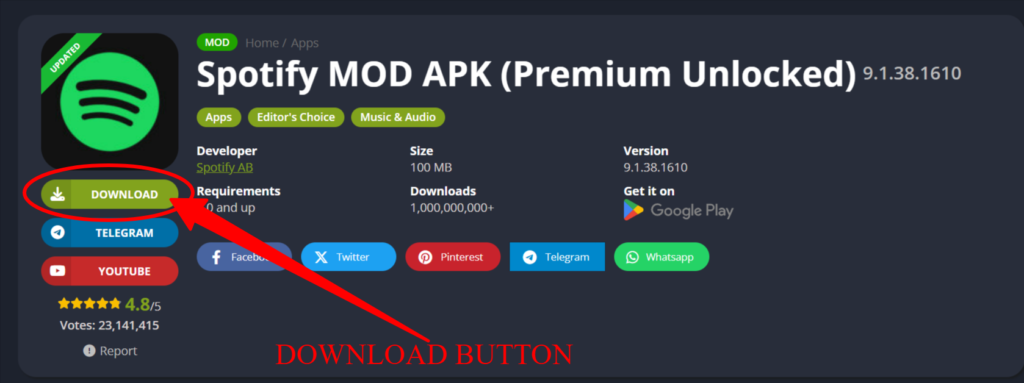
Then scroll down; there you will see download links. Below you see the app name and version on the download button. Click the download button again. An ad may open again, so simply close it. Your download should now start automatically; if not, then click again and start the download.
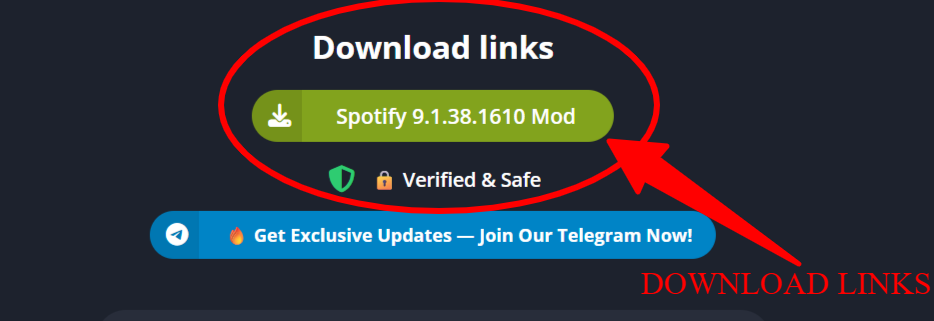
Sometimes the download may not start on the first attempt. In that case, repeat the process by closing any ads and clicking the download button again.
Important Things to Keep in Mind
Before downloading, make sure your internet connection is stable to avoid interrupted downloads. Also, ensure your device has enough storage space for the APK file.
Always read the app details and MOD features mentioned on the page so you know exactly what you are downloading.
Common Download Issues and Solutions
Download Not Starting: Close any ads that open and click the download button again.
Button Click Ads Opening: This is normal; an ad will pop up before the download. Simply close them and continue.
404 Error File not Found: Some download links are giving 404 errors, we are aware of this and are working on a fix.
Download Interrupted: Check your internet connection and try again.
File Not Downloading: Try using a different browser like Chrome or disabling ad blockers.
Is It Safe to Download MOD Apps?
All APKs available on Apps2App.com are checked before being uploaded. However, users should always take basic precautions such as downloading from trusted pages and avoiding suspicious redirects.
Conclusion
Downloading MOD apps from Apps2App.com is simple once you understand the process. Just remember that an ad may appear before the download starts—close it and click the download button again. By following this guide, you can quickly and safely download your desired MOD APK files without any confusion.
Also Check: How to Turn Off Google Play Protect on Android